Professional Phrases and Techniques for Smooth Call Management & A Guide to Understanding Warm, Direct, and Voicemail Transfers for Seamless Communication
Greetings
When interacting with customers and colleagues over the phone, your greeting sets the tone for the conversation. A professional, friendly, and clear introduction can make a significant impact. It’s also important to manage the call effectively, whether it’s handling a request, transferring to the right department, or politely ending the call. This guide provides best practices, key phrases, and the correct processes to ensure smooth communication at every stage of the call.
-
Answering the phone
Good morning/afternoon! Thank you for reaching (Legacy Company) powered by Lango. This is (Your name)! How can I help you? / How may I assist you today? - In case you are unavailable at the moment
I’m happy to assist you, but I’m currently finishing up with someone else. Would you like me to take a message or place you on hold? - Putting someone on hold
Please hold for a moment while I look into this. - Coming back to the customer/interpreter from the hold
Thank you for holding, I appreciate your patience. - Transferring to another department
Please hold while I connect you with (Department name) who can assist further. One moment, please. - Refer to point 4 when to use Warm vs Direct transfer - Before ending the call
Is there anything else I can assist you with? -
Finishing the call
Take care, and feel free to reach out again if you need anything
Transfers
Transferring calls effectively is key to providing seamless service. Whether it's a warm, direct, or voicemail transfer, knowing when and how to use each option ensures a smooth experience for both the caller and the team. This section will guide you through the transfer options and their appropriate use.
-
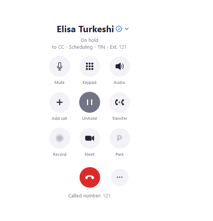
Transfers can be done if you receive a call and the person calling needs to speak to another department/person. You can put the caller on Hold and click on Transfer
-
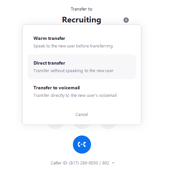
Three options will show up: Warm Transfer, Direct Transfer, and Transfer to voicemail, use them accordingly.
-
Warm transfers
Speak to the new user before transferring.
You may use this option when you need to speak with the department you are transferring the call to before completing the call.
- Different scenarios when you can use this option to transfer calls to Customer Care:
- If an interpreter reaches out to cancel a same-day request
- If a customer reaches out to put in a scheduling request
- If an interpreter/customer is a no-show
- Different scenarios when you can use this option to transfer calls to Sales
- If CC has to escalate a complaint when the customer is very upset
- If someone who is not a client reaches out to request a same-day/same-week request
-
Direct transfers
Transfer without speaking to the new user
You can use this option when you need to transfer a call directly to the person/department without speaking with them first.
- Use this option for anything that is not mentioned under the Warm Transfer
- Use this option for anything that is not mentioned under the Warm Transfer
-
Transfer to voicemail
Transfer directly to the new user’s voicemail
Under rare circumstances, you may use the Transfer to voicemail option. For instance, if you have to transfer to someone’s line or a department after hours.
-
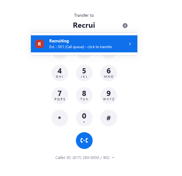
Once you have determined which Transfer option to use, you have to look up the name of the person/department to whom you need to transfer and click on it.