
This article explains the steps for addressing interpreter late arrivals or no-shows, including how Customer Care manages client concerns and resolves the issue.
This article explains the steps for addressing interpreter tardiness or no shows. When a client reports a late or no-show interpreter, Customer Care contacts the interpreter and informs the client with alternative options. The issue is logged, and the Account Executive is updated. If the interpreter provides evidence of being on time, the IRM team reviews it, and if approved, pay is reinstated, and billing is updated accordingly.
- Initial complaint: Late, no-show
- If the Customer Care team is notified by the client of the interpreter late/no-show after the start time of the job/appointment, Customer Care will do the initial outreach to the interpreter via phone/text/email.
- If there is no immediate answer from the interpreter, the Customer Care team will note the job/appointment as Interpreter no-show/Non-attendance.
- Customer Care then notified the customer directly and offered an alternate method of coverage/replacement interpreter if applicable.
- Customer Care then logs in the complaint in the Issue Log under the No-show/Late sheet.
- Customer Care will include AE with contact with Customer if via email. If information is relayed via phone, Customer Care will inform AE via email.
- Types of interpreter issues and escalation path:
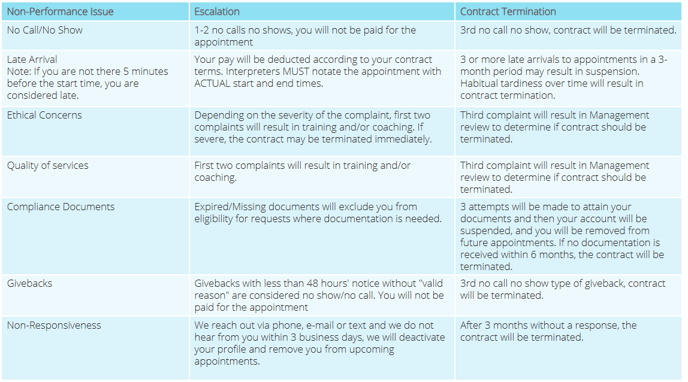
- In the event the interpreter contacts the Customer Care team to inform them of their reasons or that they were onsite on time, they will be directed to the IRM team to provide their evidence.
- If evidence is approved, interpreter pay will be reinstated and the customer will be informed of the situation to reinstate the billing. The Account Executive will notify the customer and accounting if they decide to charge the customer.
**Exceptions to these escalation measures will be determined by the IRM team.**